Day 3 — Visualizing, Publishing & Automating Insights
Theme: From data to decisions — advanced reporting and storytelling
Prerequisite: Day 2. You need a working Power BI model to present — use Data Modeling.pbix or your Day 2 homework file.
The shape of the day
Days 1 and 2 were about making the numbers correct. Day 3 is about making them matter.
The morning covers visual design and narrative — how to choose charts that don’t mislead, and how to turn a page of figures into an argument someone acts on. The afternoon covers getting it in front of people and keeping it fresh without you, then a fast, gamified capstone — six timed rounds against genuinely messy data.
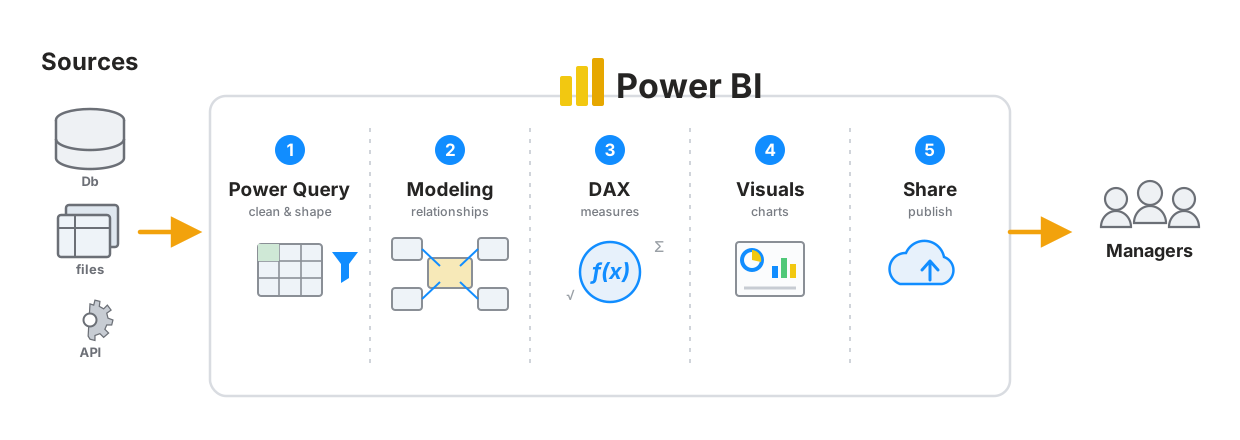
Today you finish the last two stages — Visuals and Share — and put the whole pipeline in front of decision-makers.
Morning Session — visualisation & storytelling
| # | Module | Time | You will learn |
|---|---|---|---|
| 1 | Visualization Best Practices | 75 min | Choosing the right chart, the axis-at-zero rule, conditional formatting, custom and AI visuals, slicers, drill-through, bookmarks, layout, accessibility |
| 2 | Storytelling with Data | 45 min | The three-act structure, titles that state findings, giving numbers a comparison, writing the recommendation, presenting |
Afternoon Session — publishing & capstone
| # | Module | Time | You will learn | Files |
|---|---|---|---|---|
| 3 | Publishing, Sharing & Automating | 60 min | Power BI Service, workspaces vs apps, licensing, scheduled refresh, gateways, row-level security, export, Analyze in Excel, Teams & SharePoint | uses your Day 2 model |
| 4 | Capstone — The 45-Minute Dashboard Dash | 45 min | Six timed rounds — clean, model, measure, build and pitch a one-page executive dashboard against the clock, revising the whole Power BI thread | novatech_capstone.xlsx |
Capstone data: novatech_capstone.xlsx — NovaTech Retail’s raw export, download this before the afternoon session Optional Boss Level: raw_tables.xlsx (23 sheets, take-home) with reference build Project Clean Model.pbix Worked solutions (open after your own attempt): Dashboard Dash · Boss Level
Homework
Extend, Automate, Publish — about 45 minutes. Add a measure and a slicer-driven visual to your capstone, make it robust with a refresh indicator and RLS, then publish it.
No new files — you work in your own capstone build.
Expected outcome
You can design and present a fully functional Power BI dashboard integrating Excel data, demonstrating automation and insight delivery — and explain what should be done about what it shows.
The capstone is the real assessment
novatech_capstone.xlsx is nine sheets of NovaTech Retail’s raw export — the same business you’ve worked with since Day 1, now in the state real data actually arrives in: a duplicated backup sheet, two order years with mismatched columns, junk rows that quietly break a relationship, dates carrying a time component, and product names that don’t join until they’re trimmed. Three of the nine sheets don’t belong in your model at all, and knowing which is Round 0.
Every one of those maps to something taught on Days 2 and 3. Nothing in it is new — the challenge is doing it all together, at speed, and finishing with an argument rather than a report. There is a real, specific finding buried in the numbers, and the exercise only ends when you’ve said it out loud.
Deciding what to leave out is part of the exercise — and the built-in story rewards you for looking, not just building.
The full two-hour, 23-sheet version survives as an optional Boss Level (raw_tables.xlsx) at the end of the lesson, for anyone who wants to take it home.
Where the points are
| Round | Points |
|---|---|
| 🕵️ 0 · Trap Hunt | 10 |
| 🧹 1 · Clean | 25 |
| ⭐ 2 · Model | 15 |
| 🧮 3 · Measure | 20 |
| 📊 4 · Build | 25 |
| 🎤 5 · Pitch | 5 |
Cleaning and modelling together are 50 of the 100 points. A beautiful dashboard on a broken model scores badly here — as it should, because in real life people believe it.
Previous: Day 2 · Course home: README
© 2026 Global Academy. Prepared for the ZIMASCO (Kwekwe) workshop. Facilitated by Tapiwa Zireva. Licensed to participants for personal learning — not for redistribution, resale, or reuse in other training without permission.